Every Feature You Need To Track Your Adventures

From real-time location tracking to alerts, DriftCrew has everything you need to keep your crew connected and safe during every session.

Safety Critical

Multi-Level Alert System

Communicate your status instantly with color-coded alerts that your entire crew can see in real-time

Alert

Alert

Two-tap alert that instantly notifies your entire crew with your exact GPS location. Triggers push notifications, vibration alerts, and a pulsing red marker on everyone's map.

  • Instant push notification to all crew
  • Pulsing red marker on shore crew map
  • Persists until you send All Clear
Non-Emergency

Need Assistance

After sending an alert, you can update your status to indicate you need help without a full emergency. Perfect for equipment issues, fatigue, or when you just need a hand from your crew.

  • Orange pulsing marker on map
  • Notifies crew without panic
  • Available after sending an alert

Status Update

All Clear

Resolve your alert status and let everyone know you're okay. The green confirmation appears briefly on shore crew's map before returning to normal tracking.

  • Green checkmark confirmation
  • Automatically clears alert state
  • Shore crew sees instant update
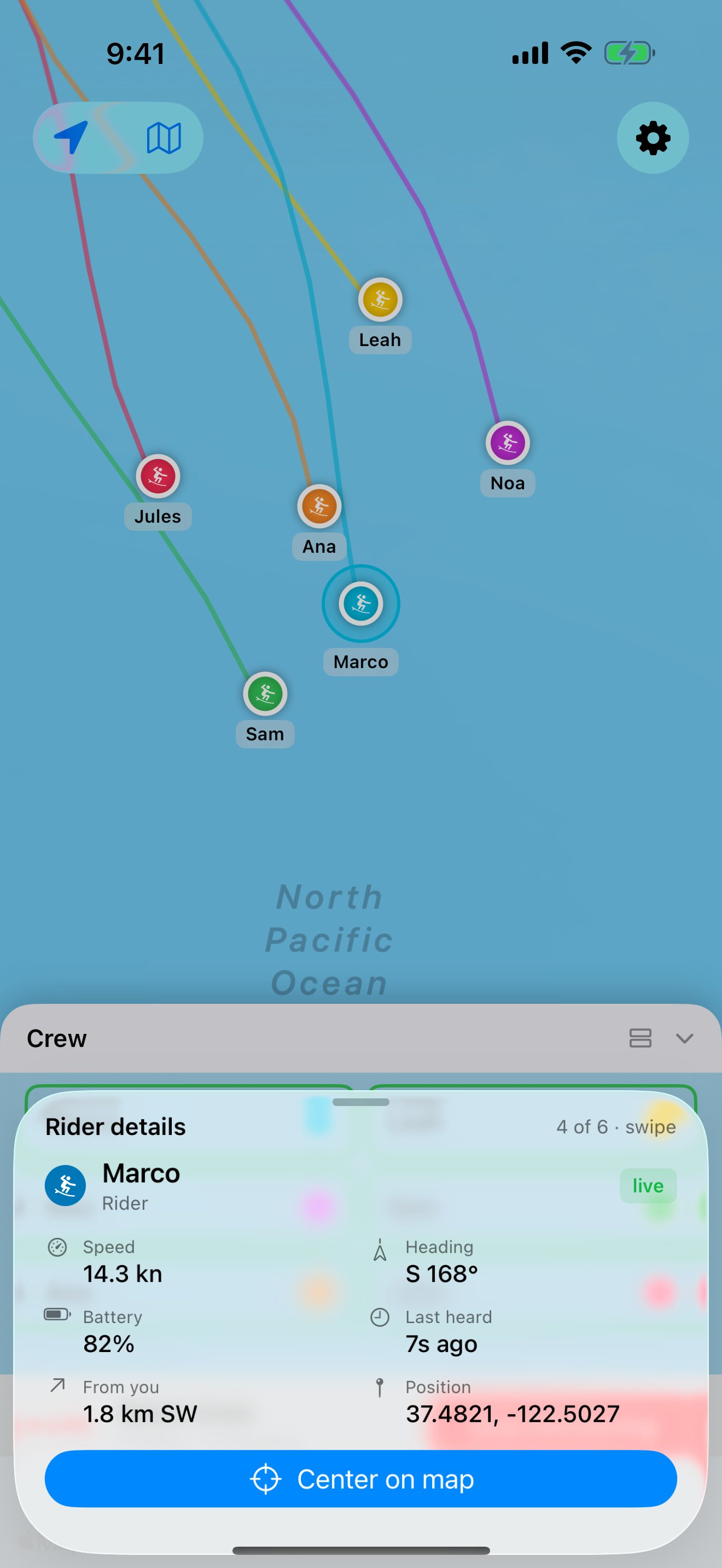
Rider details in the DriftCrew app: speed, heading, battery, last heard and distance from you
Automatic Monitoring

Smart Notifications

Proactive alerts that detect problems before they become emergencies

Stopped Moving

Get alerted if a rider hasn't moved for an extended period. Could indicate they're taking a break... or need help.

Lost Signal

Shore crew is notified when a rider's phone loses cellular connection for a configurable amount of time.

Low Battery

Battery level is tracked and shared. Get warned when a rider's phone is running low.

Customizable Alerts

Select which alerts you want monitored by and various thresholds for distance, time, speed, and more.
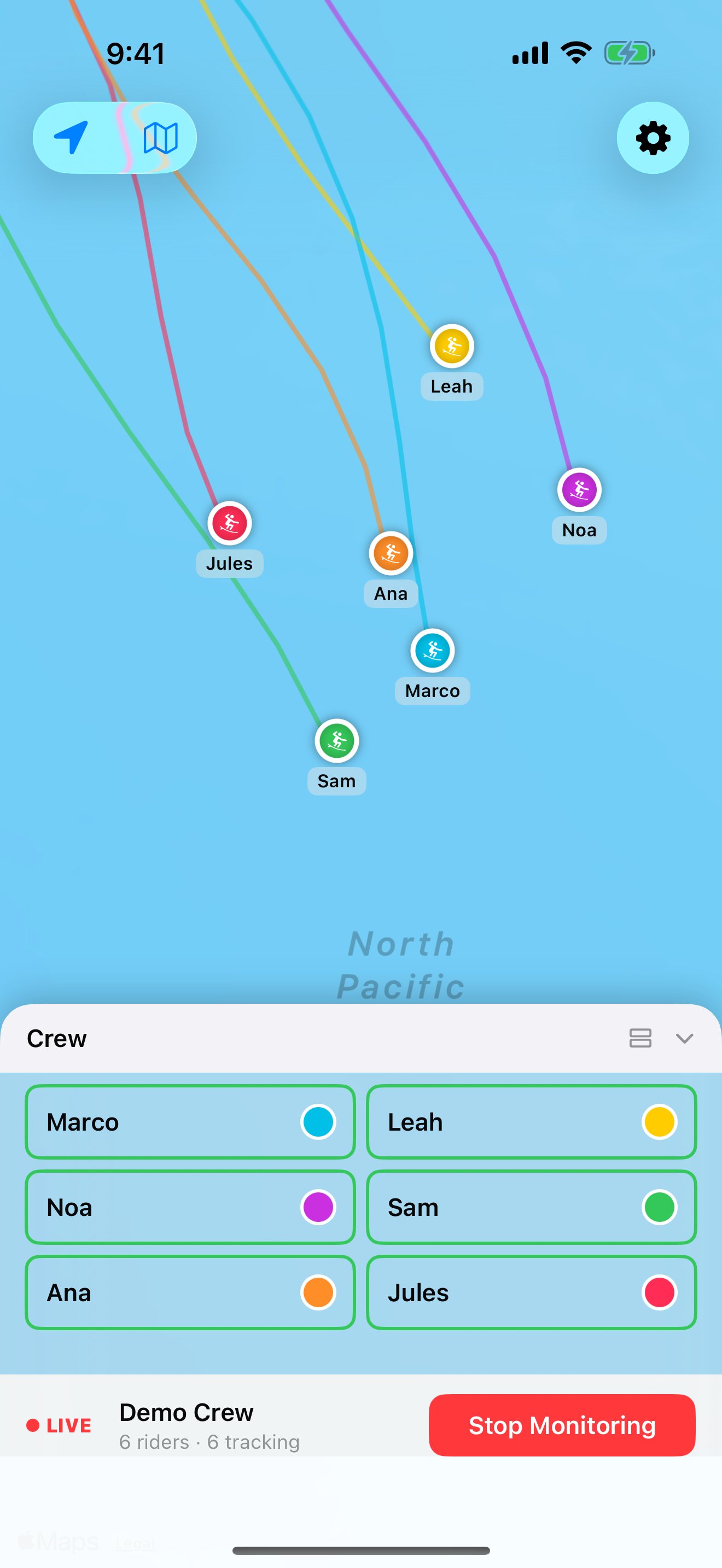
The DriftCrew live crew map with six riders' tracks and the crew list
For Loved Ones

Shore Crew Mode

Let family and friends monitor your session from anywhere

Live Map View

Watch riders move across the map in real-time with their color-coded trails.

Rider Sidebar

Dynamic sidebar shows each rider's status, connection state, and alert level.

Instant Alerts

Receive push notifications for alerts, lost connections, and status changes.

Auto-Center

Tap any rider to center the map on their location with smooth animation.
New

Crew Chat

Message your crew and shore team during a session, from your iPhone or Apple Watch: a quick reply, a text or a voice note.

  • One-tap quick replies like "Heading in" and "Wait for me"
  • Texts and voice notes when there's more to say
  • Your shore team is in the conversation too
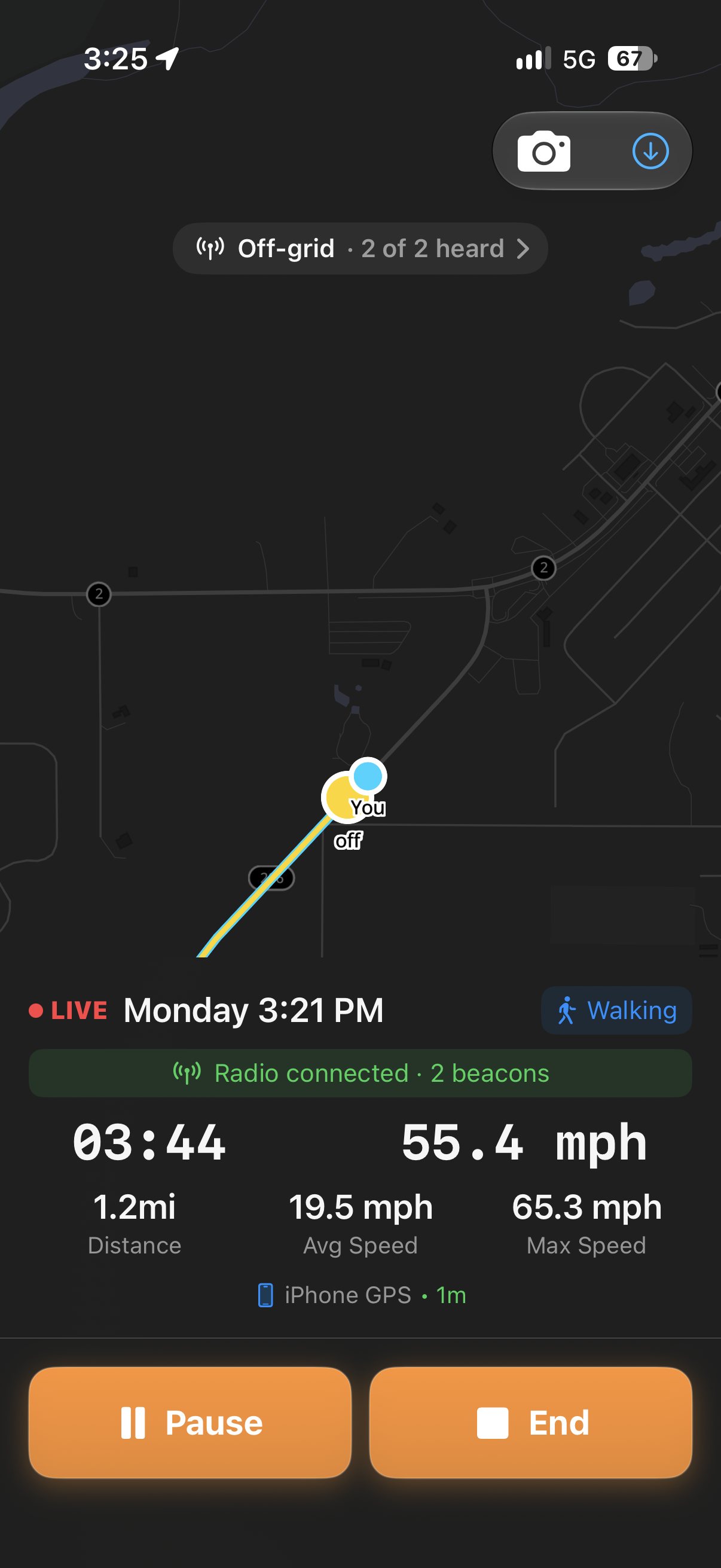
A live off-grid session in the DriftCrew app on a dark offline map, with 2 of 2 beacons heard and the radio connected
Off-grid Beta

Lead the group where there's no signal

Your group carries mesh radio beacons and the leader carries the phone. Every beacon stays on your map, and your phone alerts you on an SOS, or when a beacon stops moving, strays too far or goes quiet. Nothing leaves the phone.

Offline maps

Frame the water you ride and save it, down to street level. The Offline map works with or without signal.

Roll call

See at a glance how many beacons you've heard in the last few minutes, and which ones you haven't.
Mesh Radio Beta

Beacons on a Long-Range Radio Mesh

Pair a MeshCore radio with your phone and DriftCrew hears small LoRa GPS beacons nearby, then puts them on the same live map as your crew and shore team.

Beacons for Anything

Clip a beacon to a board, a bag or a dog, or hand one to a friend who won't take a phone in the water. Name it, pick its color, and it shows up as a pin on your map.

No Cell Signal Needed

Beacons talk to your leashed radio over LoRa, a long-range, low-power radio mesh. Your phone hears them even where there is no cell coverage at all.

One-Button SOS

Hold the beacon's button to raise an SOS. It alerts you and your whole crew, riders and shore team, just like an alert from a full crew member.

Shared With Your Crew

During a session your phone shares your beacons with the crew and shore team, so everyone sees them on the map, on iPhone, Android and Apple Watch.

What you need

Beacon

Seeed SenseCAP T1000-E

A small GPS tracker carried by whoever, or whatever, you want on the map. One per beacon.

Leashed radio

Seeed Wio Tracker L1

Pairs with your phone over Bluetooth and passes along every beacon it hears.

Repeater (optional)

Seeed SenseCAP Solar Node

A fixed, solar-powered relay on high ground that extends coverage at your spot.

All of them run custom DriftCrew firmware. Other MeshCore radios aren't supported yet. Read the Mesh Radio FAQ

Mesh Radio is in beta

Mesh radio support works today, but it's early. It needs custom DriftCrew firmware on a short list of specific hardware, and range, battery life and alerting are all still being tuned. Details will change as we learn from testers.

Use it for testing only. Don't rely on a beacon for safety: always carry your phone and your usual safety gear, and keep your crew's safety plan.

Join the Mesh Radio beta

Tell us your phone (iPhone or Android), your home country, and which radios you already have, if any.

Share

Share the ride

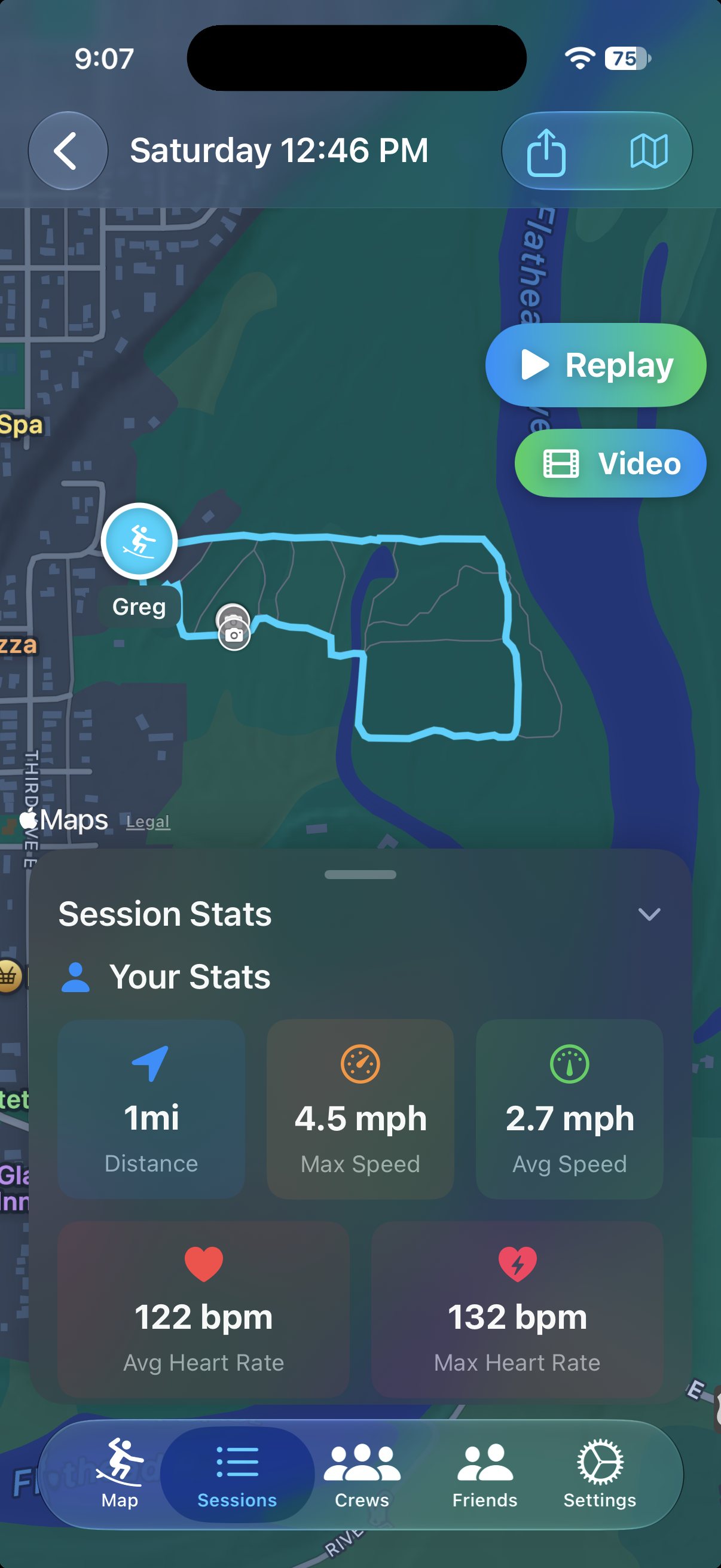
Send anyone a free replay link that opens in a browser, no app needed. Or turn the ride into a short flyover video of your track for any social app.

  • Each rider's track in their own color, with your photos and videos along the route
  • Flyover videos in vertical, square or landscape, 15 to 60 seconds
  • No real names on shared rides, and links expire after 30 days
A finished session in the DriftCrew app with Replay and Video buttons and session stats
Ride video · made in the app
A post in the DriftCrew feed with the ride's stats, its track on a map and a Replay button
Feed and challenges

Challenges that reward riding together

Post your rides to your friends' feed, reply and react, and join challenges. We reward time on the water and riding with a crew, never going further out alone.

Monthly goals

Hours or distance on the water this month, per sport.

Weekly streaks

Ride at least once a week. The wind picks the day, so streaks are weekly, not daily.

Crew goals

Create a challenge for your friends and ride toward it together.

Safety badges

First ride with a shore team, ten crew rides, a beacon on every ride. Always free.

Your privacy matters. Choose which sessions and media to share publicly.

Apple Watch

On your wrist

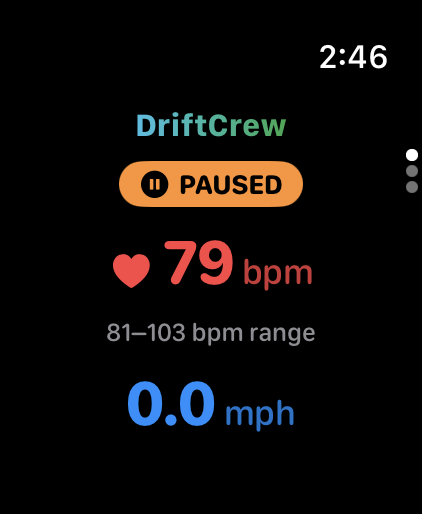
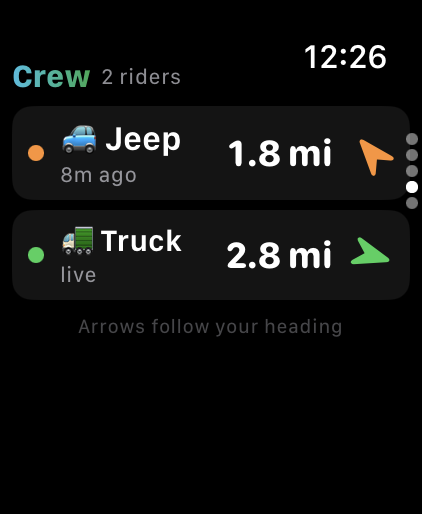
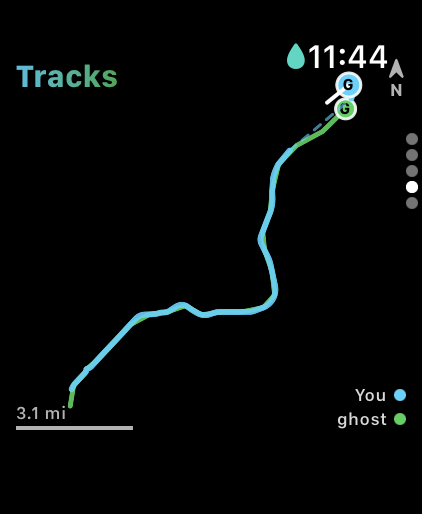
Start a ride, check your crew and beacons, send an alert or a quick reply, and save every session to Apple Health, right from your wrist.

Apple Watch main face with elapsed time, live heart rate and speed
Apple Watch Tracks face showing your route and crew positions
Apple Watch Crew face listing riders and beacons with distance and direction
Apple Watch session summary with duration, distance, speed and heart rate
And more

Everything Else You Need

The details that make a session easier, before, during and after.

Wind forecast

Wind for the next 12 hours, and tides where we have them, in the app and in a home screen widget.

Home screen widgets

Your crew's status and the wind at a glance, without opening the app.

Crew Management

Create and manage multiple crews for different riding groups or locations.

Friend Connections

Mutual friendship required for tracking. Only people you trust can see your location.

Map Styles

Switch between standard, satellite, and hybrid map views for the best visibility.

Apple Health

Every session saves as a workout with distance, calories and heart rate.

Ready for your next adventure?

Join the growing community of adventurers tracking and sharing their sessions together.